Choosing an Agent Type
Three agent types are available when creating a Voice Agent. The type determines how the conversation logic is built and can't be changed after creation; pick based on the call's actual complexity.
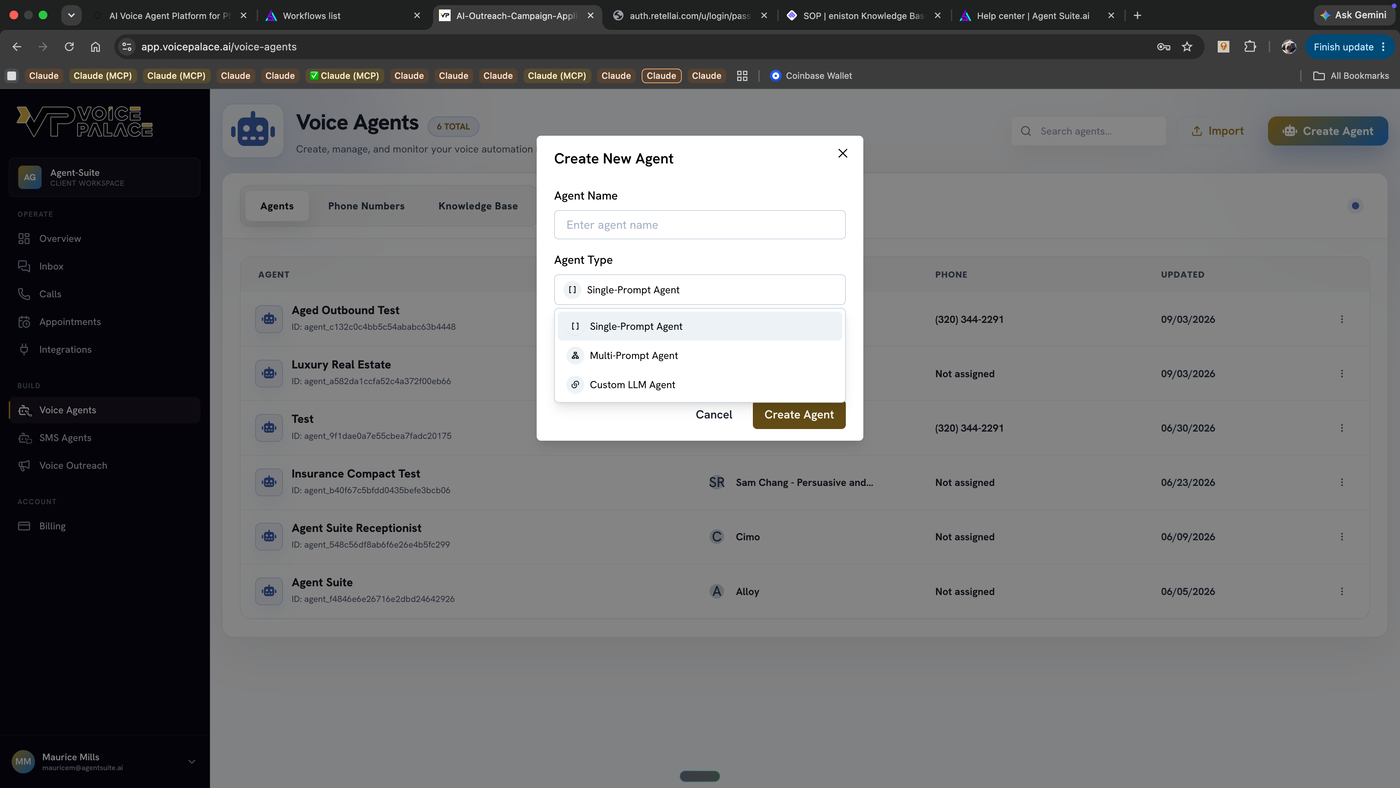
When creating a new Voice Agent, pick one of three types:
Single-Prompt
One prompt field controls the entire call. Use this when the call has one linear goal and doesn't need distinct handling for wildly different caller responses (e.g., booking an appointment, delivering a reminder). This is the default choice; start here unless the call genuinely needs branching logic.
Multi-Prompt
A visual flow editor splits the conversation into connected states, each with its own prompt. Use this when the call needs to follow meaningfully different paths depending on what the caller says, e.g., separate logic for "wants to book," "has objections," "wants a callback," and "asks to be transferred." If you're finding yourself writing a single-prompt agent with a dozen conditional "if they say X, do Y" branches, that's the signal to switch to Multi-Prompt instead.
Custom-LLM
Routes the conversation to your own LLM endpoint instead of VoicePalace's built-in model. Use this only if you're running a model VoicePalace doesn't offer, or need control over the model layer that the platform doesn't expose. Most agents will never need this.
Steps:
Voice Agents → Create Agent
Enter an Agent Name
Select Agent Type
Create Agent