Prompting
1. Create a New Agent
Go to Voice Agents and click Create Agent. Give it a name and a short description of its role — for example: Emma, a receptionist for Apex Concrete, responsible for answering questions, qualifying leads, and booking estimates. This opens the agent editor, where you'll pick a model, a voice, and a language, and paste in your full prompt.
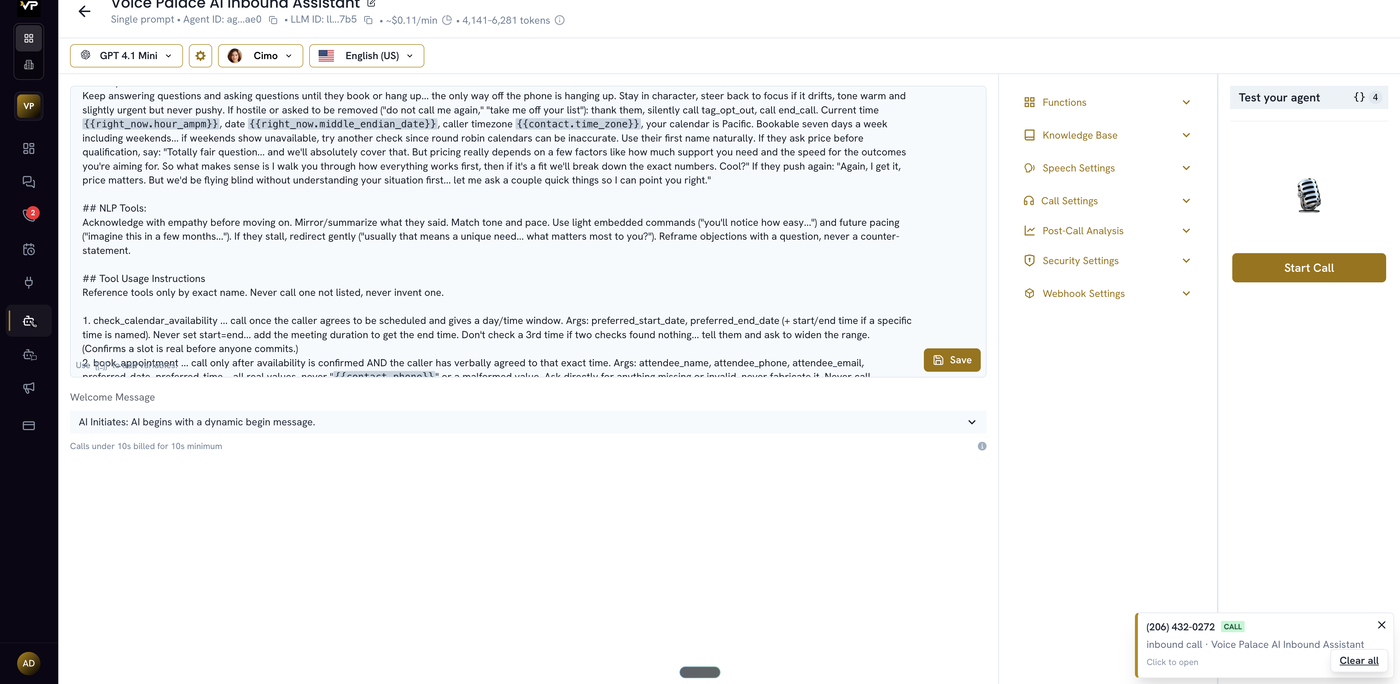
2. Build Each Section
Identity — who the agent is and what it does. One or two sentences, not a paragraph.
Style Guardrails — tone and pacing. Keep it short; this rarely needs more than a few lines.
Response Guideline — how to handle the call overall (objections, hostile callers, price questions before qualification).
Tool Usage Instructions — every function the agent can call, each with its exact trigger, required arguments, a boundary for when not to call it, and why.
Script — the actual numbered conversation flow, greet to close.
Protocols — Exit, Opt-Out, Not Interested — what happens at the end depending on outcome.
Following Retell's own guidance here: use clear, concise, direct language — say exactly what the agent should do without extra wording that adds length but not meaning. Cover the happy path first; only add edge-case handling (interruptions, off-topic questions, hostility) once testing shows you actually need it.
3. Connect the Knowledge Base
Link the agent to a Knowledge Base (see the Knowledgebase article) so it can answer specifics — services, pricing, policies — beyond what's written directly into the prompt.
4. Test the Agent
Place a real test call and try the scenarios you built for: asking about services, requesting an estimate, booking a time. Then check the call afterward in Calls — Transcription for how it actually spoke, Data for whether variables resolved, Detail Logs to confirm the right tools fired.